Docker for DevOps Engineers 🐳
I am a motivated and dedicated DevOps engineer. keep learning keep growing.
Introduction 🌟
Docker has become a fundamental tool in the DevOps toolkit, enabling engineers to create, deploy, and manage applications in isolated containers. These containers package the application and all its dependencies, making it easier to ensure consistency across different environments.
1. What is Docker? 🐋
Docker is an open-source platform designed to automate the deployment of applications inside lightweight, portable, and self-sufficient containers. These containers can run on any environment with Docker support, eliminating the infamous "it works on my machine" problem.
2. Docker for DevOps Engineers 🚧
Docker offers DevOps engineers numerous benefits:
Consistency: Docker containers ensure that what works on a developer's laptop will also work in production.
Isolation: Applications and their dependencies are isolated within containers, preventing conflicts and making troubleshooting easier.
Scalability: Docker allows easy scaling of applications by creating and managing multiple containers.
Portability: Containers can be moved between different environments, providing a consistent experience.
Version Control: Docker images and containers can be versioned, making it easier to roll back to previous states if issues arise.
3. Essential Docker Commands 💻
To harness the power of Docker, you'll need to master some essential commands:
Installing Docker 🛠️
sudo apt-get updatesudo apt-get install docker-ce
Building Images 🏗️
docker build -t image_name:tag .
Running Containers 🚀
docker run -d -p host_port:container_port --name container_name image_name:tag
Viewing Containers 🕵️
docker ps(active containers)docker ps -a(all containers)
Stopping and Removing Containers ⛔
docker stop container_iddocker rm container_id
Managing Images 🖼️
docker images(list images)docker rmi image_id(remove image)
Interacting with Containers 📝
docker exec -it container_id /bin/bash(enter container)
Logs and Inspecting Containers 📋
docker logs container_iddocker inspect container_id
Cleaning House 🧹
docker system prune -a(remove all unused containers, networks, and images)
4. Tasks 📋
docker installed check version :

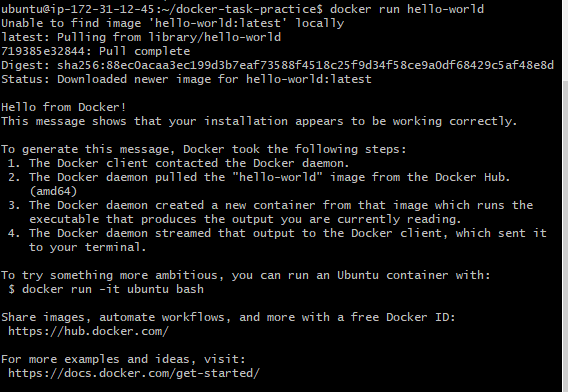
1. Use the docker run command to start a new container and interact with it through the command line.
docker run -it <image_name> /bin/bash
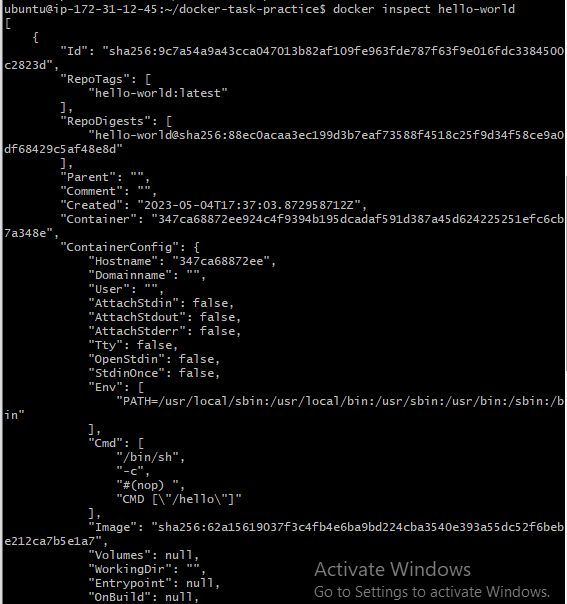
2. Use the docker inspect command to view detailed information about a container or image.
docker inspect <container_or_image_name>
3. Use the docker port command to list the port mappings for a container.
docker port <container_name>
OR
docker ps -a
docker ps It shows all the containers which are in running state.
docker ps -a lists all the containers (running as well as stopped)

4. Use the docker stats command to view resource usage statistics for one or more containers.
docker stats command is used to see live stream a container's runtime metrics*. The command supports CPU, memory usage, memory limit, and network IO metrics.*
docker stats <container_name>
5. Use the docker top command to view the processes running inside a container.
docker top <container_name>
6. Use the docker save command to save an image to a tar archive.
docker save -o <output_file_name.tar> <image_name>
7. Use the docker load command to load an image from a tar archive.
docker load -i <input_file_name.tar>
Conclusion 🚀
Docker is a game-changer for DevOps engineers, providing the tools to package, distribute, and run applications consistently across different environments. Mastering essential Docker commands and understanding its benefits will empower you to streamline your DevOps workflow and ensure smoother deployments. So, embrace the Docker whale and sail towards more efficient DevOps practices! 🌊🐳🛳️
With these Docker skills in your toolbox, you're well on your way to becoming a more efficient and effective DevOps engineer. So, go ahead and dive into the world of Docker – your future self will thank you! 🛠️🔗
Happy containerizing, and may your DevOps journey be as smooth as a Docker whale's glide through the ocean! 🌊🐋


